Project Structure
Project → Day → Scene → Shot → Takes. No chaos and no extra screens.
 ClapKit
Built for real shooting days
Create projects, capture takes, keep notes, and export reports right after wrap. Clean, fast, and production-ready.
Scenes, shots, and takes in one flow
Export to CSV and XLSX
Project transfer via .clap
Features
Project → Day → Scene → Shot → Takes. No chaos and no extra screens.
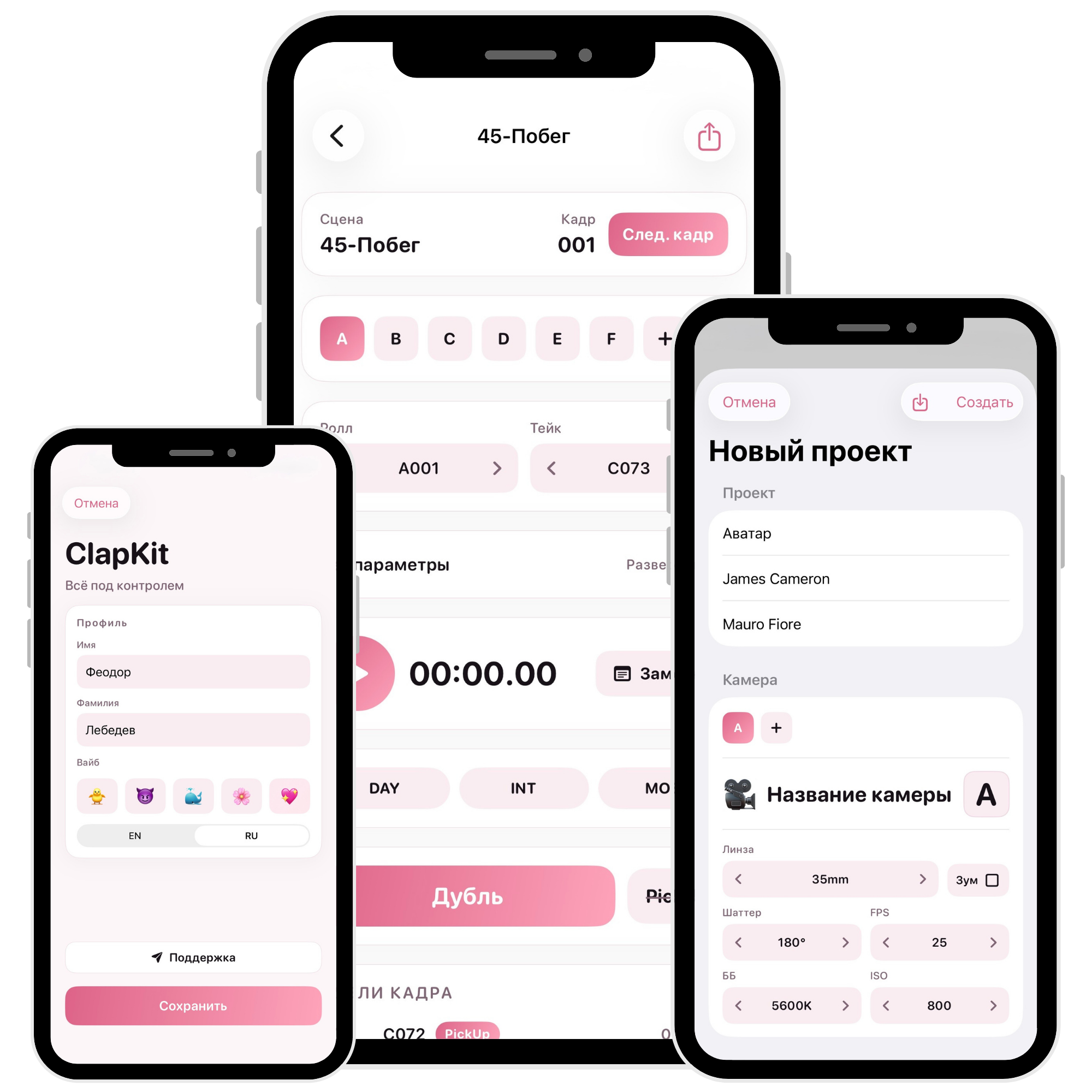
Precise action duration directly on the workspace screen, linked to each take.
DAY/NIGHT, INT/EXT, SYNC/MOS, PickUp, plus notes with quick tags.
Lens, FPS, Shutter, ISO, WB and extended parameters with last-value persistence.
Up to 12 cameras per project, each with its own roll/file and tech settings.
Ready-to-share CSV/XLSX reports and project transfer between devices using .clap.
How it works on set
Add production details and default camera settings.
Timer, states, notes, and technical data are captured in real time.
Take auto-increment, carry-over values, and a clean structured data flow.
Generate clean reports and share with the team with no manual rewrite.
Less manual typing, fewer mistakes, and more focus on real set work.
Message Support